For Game Stores
TurnZero HQ for Game Stores
A console at the counter, a display on the wall, and players joining from their own phones. This is the short version of what a store gets and where each of the four setup guides picks up.
What a store actually gets
Most shops run Magic events on a clipboard, a whiteboard and one member of staff who cannot leave the floor. It works, and the cost of it is that the person who could be selling singles is instead walking the room counting empty seats.
TurnZero HQ replaces the clipboard with one screen that already knows the answer. It knows how many people are here, which table is short a player, which table has been sitting full and waiting to start, who has been waiting longest, and who at the counter still needs chasing for a Companion check-in. It is the same product your players already use to track their own games, seen from the store's side of the counter.
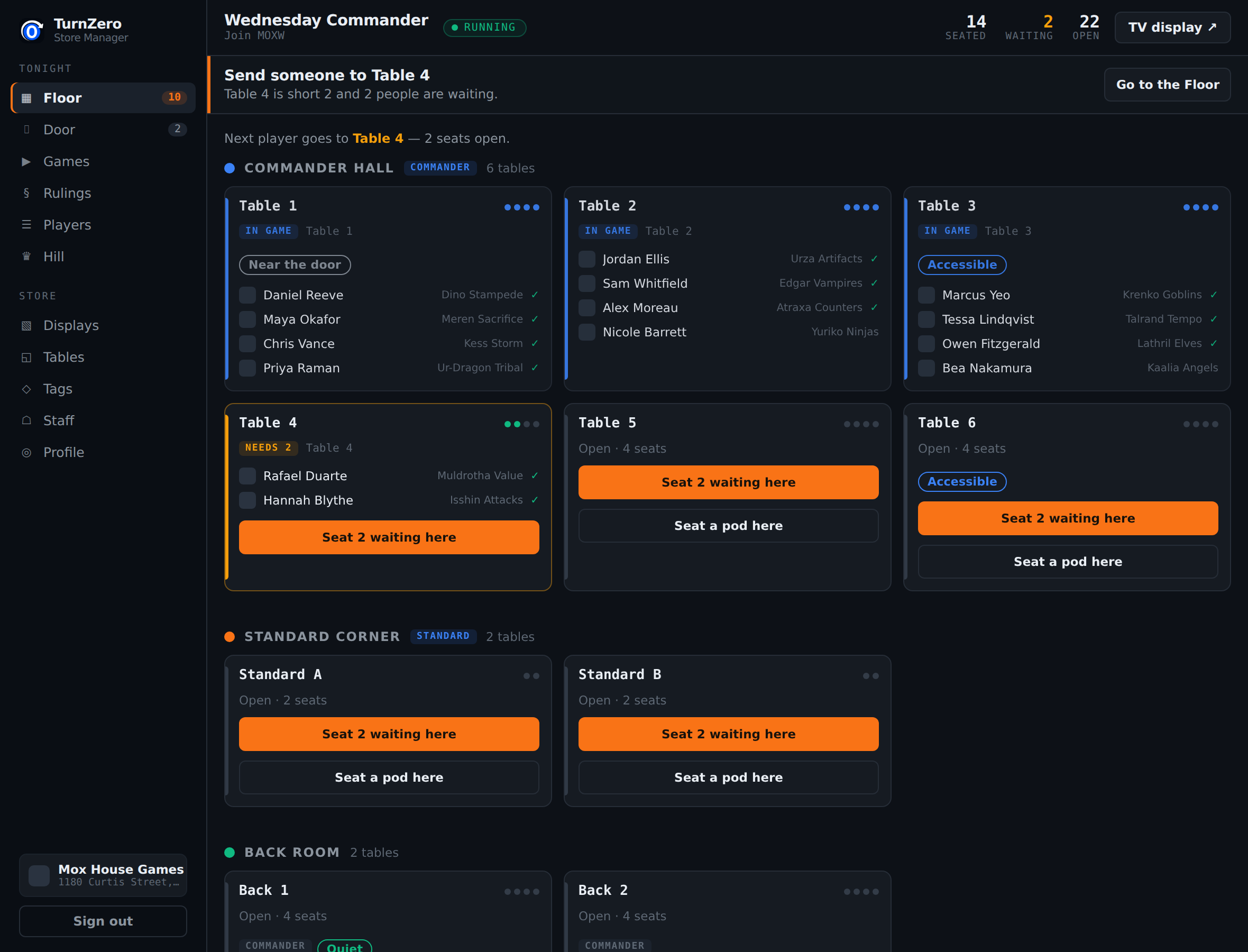
Three screens, and only one of them is yours to buy
The store console lives at lgs.turnzerohq.com and is the screen your host leaves open all evening. It wants a keyboard, so it belongs on the counter machine rather than on a tablet.
The wall display is a separate address, tv.turnzerohq.com followed by the event's join code, and it signs nobody in. Any TV with a browser can show it. It rotates through the tables that are playing, the join code for anyone still standing about, and the store's own leaderboards.
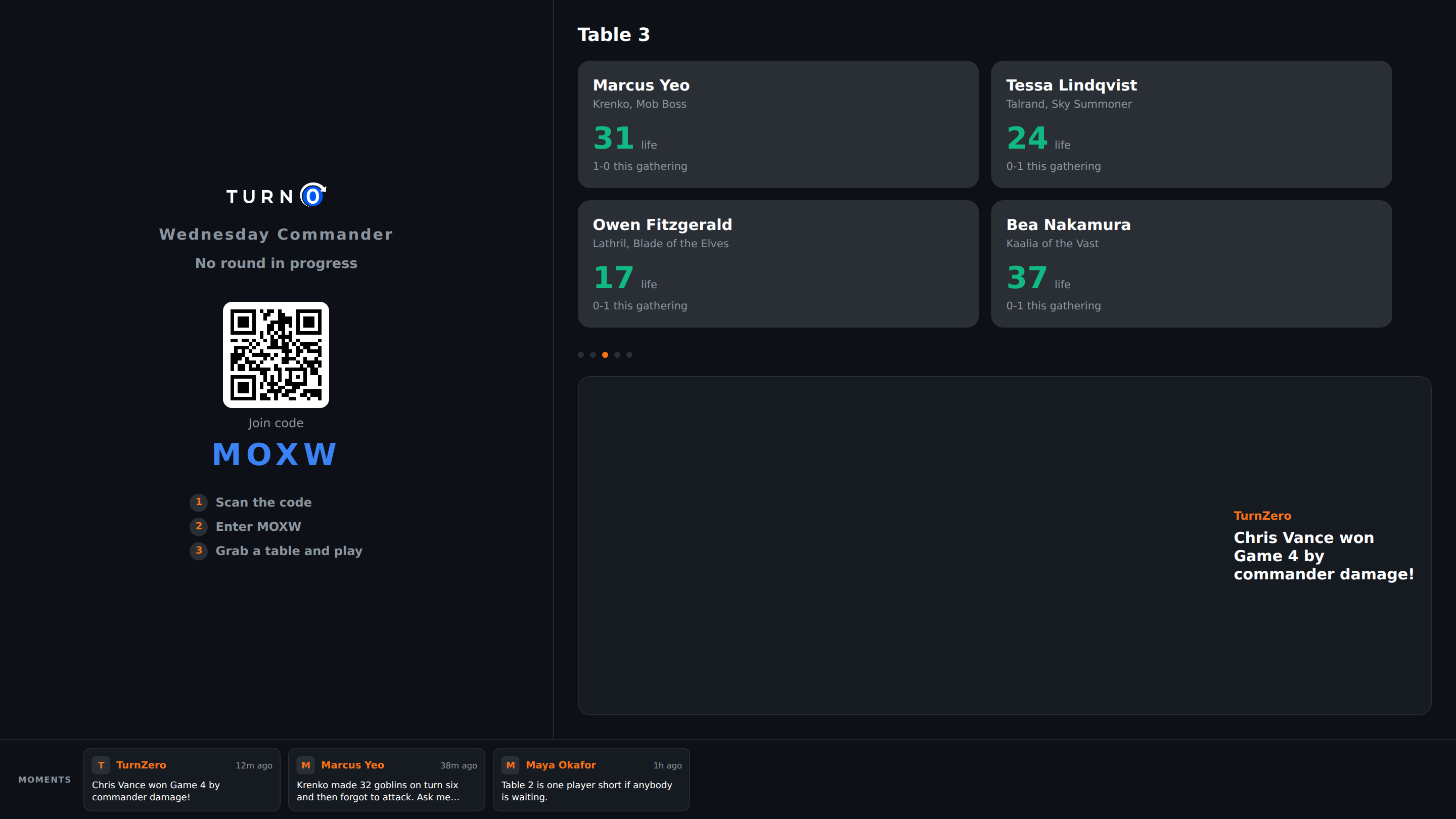
The third screen is the player's own phone, and it is the one that costs you nothing. They scan the code, pick the deck they brought, and their life totals, commander damage and results feed the console and the wall without your host typing anything.
The four guides
Read them in order the first time. After that, the last two are the ones you come back to.
What it costs
$39.99 a month for one store location, and that covers every event you run. There is no per-player fee, no per-event fee, and no limit on how many pods go at once, which matters because the events where a per-table fee would hurt are exactly the good ones.
Players pay nothing. They join free by QR code or join code, on the web or in the app, and nothing they need for the event is behind a subscription of their own.
A free month, if you are a smaller shop
We are handing out free months to independent stores that want to try running an event on it before deciding anything. Email support@turnzerohq.com with your store's name and city and we will send a code you redeem from the app. It grants the store plan outright rather than a trial that can downgrade you mid-evening without warning.
What it does not do
It does not talk to EventLink. Nothing can, because Wizards publishes no API to write an event to, and any product claiming otherwise is asking a human to retype it somewhere you cannot see. What TurnZero HQ gives you instead is the attendance list built while the room is still full, and a column showing who has not confirmed yet, so the reconciliation is a two-minute job at the counter rather than a memory test at closing.
It does not bring you players either. It improves the event your regulars already have, and it gives them a record at your shop specifically, which is the part that makes next Wednesday feel like a continuation rather than a fresh start.
What does TurnZero HQ cost for a game store?
$39.99 a month for one store location, covering unlimited events. There is no per-player fee, no per-event fee, and no cap on how many pods run at once. Players join free from their own phones, on the web or in the TurnZero HQ app.
What hardware does the store need?
What most shops already own. One machine at the counter with a keyboard for the store console, and a TV on the wall for the display. The wall display needs no sign-in and no app: point any browser-capable TV at the event's join code. Players use their own phones as the third screen.
Does TurnZero HQ submit our event to EventLink?
No, and no software can. There is no public Companion API to write to. What TurnZero HQ does is build the accurate attendance list you reconcile against EventLink, and show you who is still outstanding while the room is still full. Sanctioned Commander is normally Player List Only, so that list is the whole obligation.
Do players have to install anything?
No. A player scans the QR code at the counter or types the four-character join code, and they are on the event. The app is worth having, because it carries their decks, their record and their history between visits, but it is not a condition of playing. Someone with no account at all can be added as a walk-in from the console.
We already run a Commander event. Why change anything?
That is exactly who this is for. TurnZero HQ does not bring you players. It takes the organizing off your counter so one staff member can run a full room, and gives your regulars a record that follows them week to week rather than an event that starts over every time.
Can more than one person at the shop run the event?
Yes. Staff are added by email address from the console, and an address that has no TurnZero HQ account yet is held as a pending invite that takes effect the moment they sign up. Managers can change the room; staff can open the console and run events.
Set your store up and run an event on us.
Create your store profile, add your tables, share the join code. Four steps from the sign-in page to a room that runs itself.
Open the Store Console