How to use TurnZero HQ
TV Mode
A join code typed into a browser and the whole evening goes up on the wall: every table's life totals, the way in for anyone still standing around, the round clock, and a callout the moment somebody gets knocked out. Nothing to sign into and nothing to tap.
A second screen for the room, not a mirror of a phone
The phone in the middle of the table is for the four people around it. Everyone else in the room, the pod that finished early, the person who arrived late and is looking for a seat, the two waiting on a table, has nothing to look at. TV Mode is the screen those people read.
It is a web page and nothing else. The join code is the whole address, so a browser pointed at
tv.turnzerohq.com/YOURCODE is the entire setup. There is no
casting handshake, no pairing, no second app, and no screen mirroring, which means the display is not tied to
one phone's battery or to whoever happens to be holding it.
It also signs nobody in. The page carries no account and no login, because a screen on a wall is walked past by everyone in the building. The join code is what stands in for knowing the room, the same as it does when a player joins the night from their own phone. How a gathering and its join code work →
What's on the screen
The layout splits into three parts, and only the middle one moves.
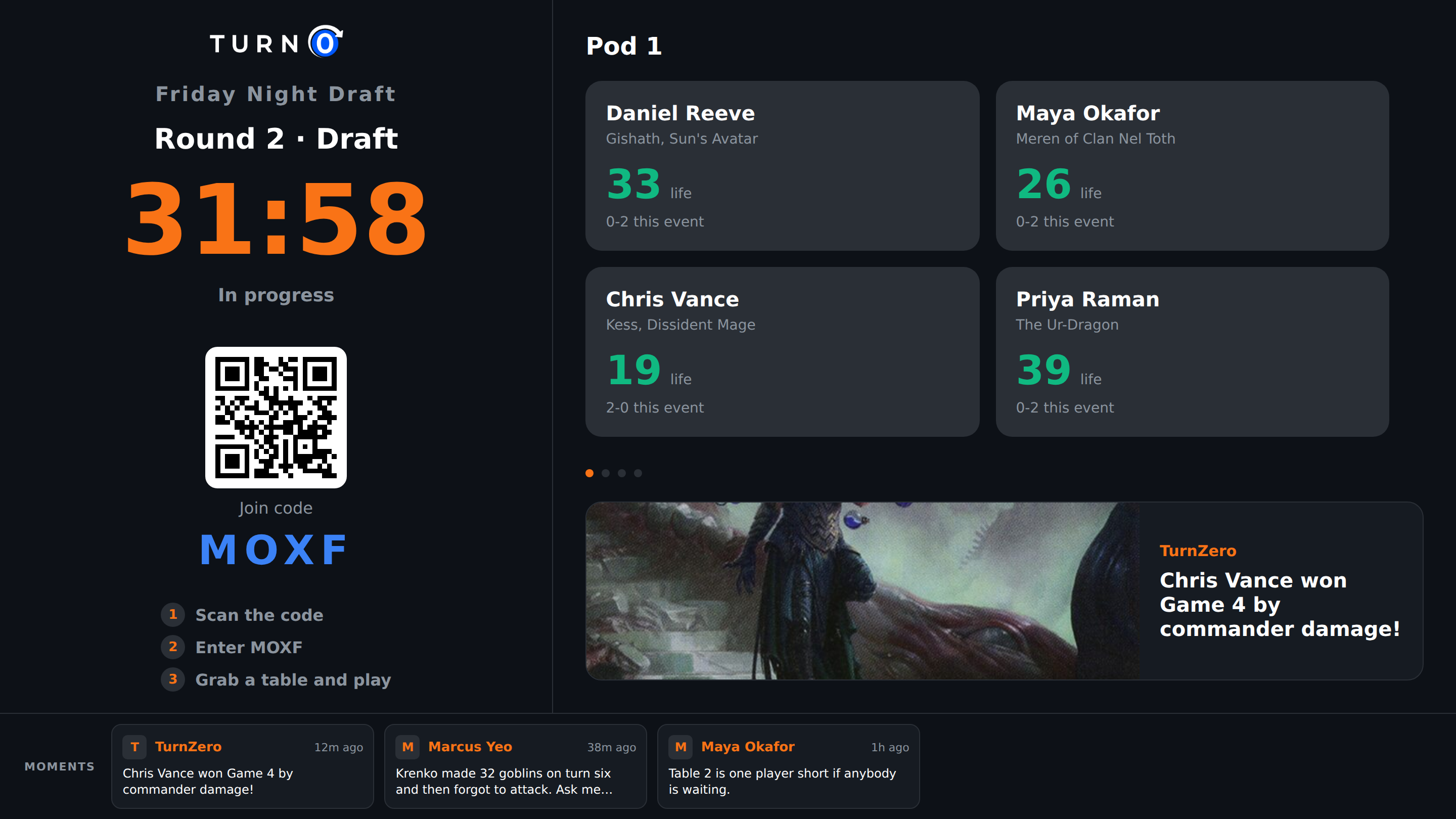
A fixed left column with the night's name, the join code in large type, a QR code, and three numbered steps: scan the code, enter the code, grab a table and play. It is on screen all evening rather than only at the start, so somebody walking in during game three can join without waiting for a lull.
A round clock, when the night is running rounds. The countdown is the biggest thing in the column while a round is live, and it says whether the round is waiting to start, in progress, or ended. Casual nights with no rounds simply say so and give the space back.
The main panel, which rotates through the tables that are playing and the other things worth a slide. Dots underneath show how many slides are in the rotation and which one is up.
A Moments strip along the bottom, showing what players have posted from their phones during the evening, newest first, with a thumbnail when the post carried a photo.
What it rotates through
The main panel gives each table that is playing a slide of its own, holds it for a few seconds, and moves on. A table's slide shows every seat: the player's name, the commander they are on, their life total, and their record for the event so far. A seat that has been knocked out is drawn differently from one that is simply on low life, and it names who did it, because those two things look identical if all you print is a number.
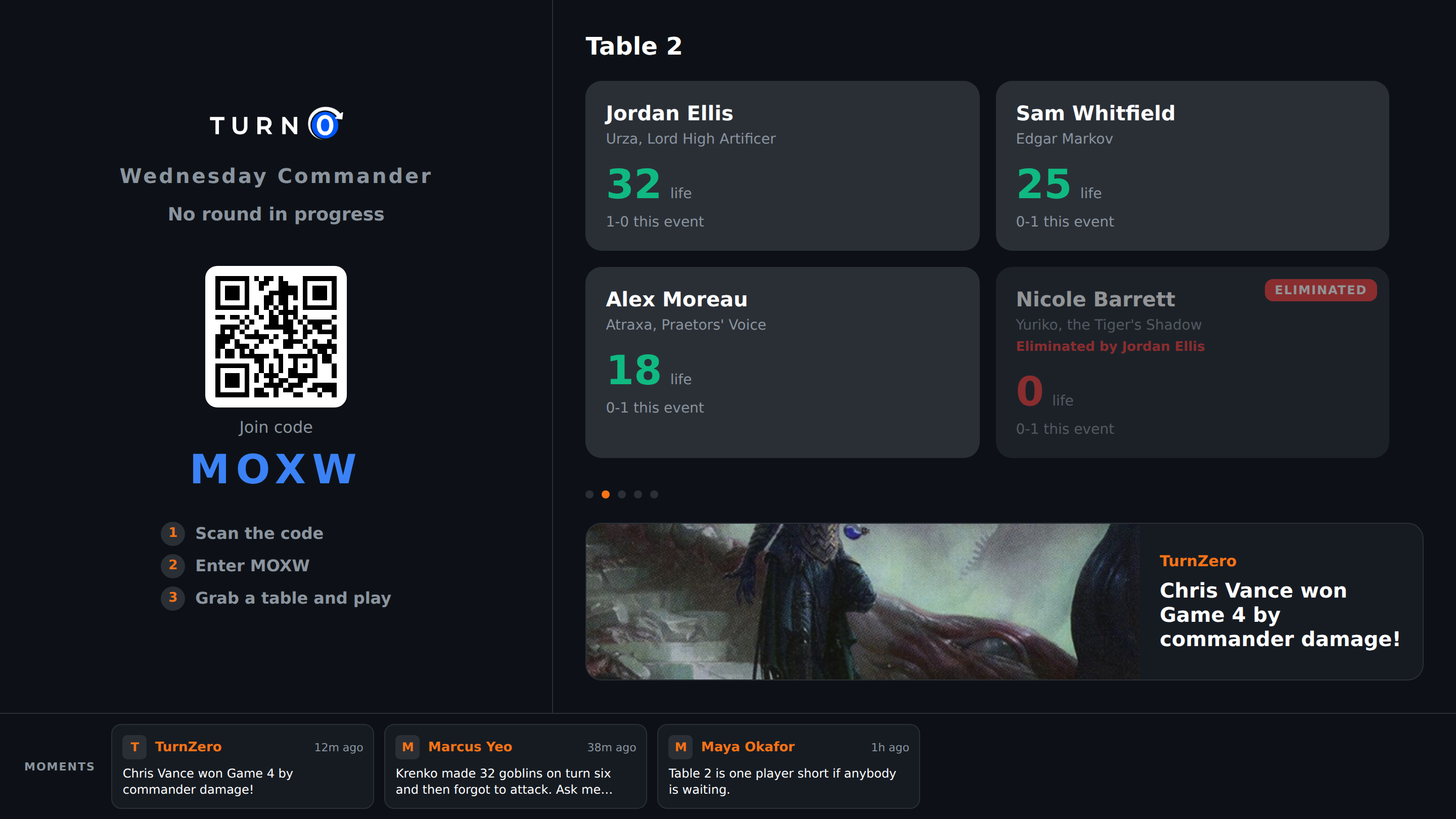
Underneath the seats sits one Moment, blown up, cycling every half minute through what the night has produced. A Moment posted with a photo shows the photo; one that spotlighted a card shows that card's art. It is the same feed the players are reading on their phones, given the size it deserves on a wall. More on Moments and the night feed →
Around the games, the rotation fills itself in sensibly. Before anybody has started, the panel is a list of the tables and who is sitting at each one, which is the one thing a room full of people looking for a seat actually needs. With nothing on any table at all it either invites people in, at full size, with the QR and the three steps, or on a tournament night shows the standings, because that is what a room between rounds is watching. How standings work across a whole night →
A store running TurnZero HQ gets one more slide: King of the Hill, the three-column board naming who is on a run right now, who leads the venue all time, and the deck to fear. It appears only once there is something to say, so a shop's first Thursday is not a leaderboard about nobody, and it is held back while tables are seated but nothing has started, since a leaderboard is the wrong thing to rotate over a seating list. King of the Hill on a store's night, with the frame →
Eliminations and big hits get the whole screen
Some things are worth interrupting for. When a player is eliminated, or somebody swings at the entire pod at once, the display drops a full-screen banner naming who did what to whom and at which table, jumps the rotation to that table, and holds it there long enough for the room to look up. Then it puts itself away and the carousel carries on.
This is the part that makes a wall screen worth having rather than merely informative. A table three rows away finishing somebody off is the moment a room reacts to, and without a screen it is four people quietly writing down a result.
Turning it on
There is nothing to enable and nothing to buy. Every gathering with a join code has a display link, whether it is a store's Friday night or four people at a kitchen table, and it takes three steps to get it on a screen.
Open the gathering in the app and go to Configure. TV Mode sits in the In Game section, under the round controls.
Press Open TV Mode to launch it, or Copy Link and send the address to whichever machine is driving the screen.
Open that address in a browser on the display and leave it. Nothing else has to happen on it for the rest of the evening.
The address is the join code on the end of the display's host, so it can also simply be typed in on the TV
itself, which is usually faster than sending a link to a machine with no keyboard. Older links of the form
/tv/CODE still resolve, so a screen set up before the display moved to its own address keeps
working.
What you need to run it
A screen, a browser and a network connection. The page is built to be tiny and carries no sign-in code at all, which is what lets an unremarkable smart-TV browser render it without complaint. Anything in this list works:
A smart TV's built-in browser, typed straight into the address bar.
A laptop, mini PC or spare tablet on an HDMI cable, which is the most reliable option because you get a real keyboard for the one time you have to type the code.
A projector, for a room big enough that a television would not carry to the back of it.
A second monitor at the counter, if the point is the people waiting rather than the people playing.
What it does not need is a phone to mirror. The display talks to the night directly, so the device that set the evening up can go back to being a life tracker. The board the table itself is playing on →
Who this is for
A playgroup with a television in the room. Nothing to enable and nobody to ask: the gathering already has a join code, so the night goes on the living-room TV the same way it goes on a shop wall.
Stores running a Commander night. The join code and QR are on the wall all evening, so signing people in stops being a conversation at the counter, and the room can see which tables are live and who is winning.
Draft and tournament nights. The round clock is the thing everybody keeps asking about, and putting it where the whole room can see it answers the question before it is asked.
Nights that outgrow one table. Once there are three or four pods going, nobody has the whole picture. The display is where the evening adds up.
Anybody who wants the night to feel like an event. Standings, Moments, and an elimination banner across a wall are the difference between four private games and one evening the room was at.
Common questions
Do I need a smart TV, a Chromecast or an Apple TV?
No. TV Mode is a web page, so anything with a browser can show it: a smart TV's own browser, a laptop or a spare tablet plugged into an HDMI port, a projector, or a monitor on a shelf. There is no casting step and nothing to pair, because the screen is not mirroring a phone. It loads the night itself.
Can I use TV Mode for a home playgroup?
Yes, and with nothing to turn on. Any gathering with a join code has a display link, so a group playing in somebody's living room can put the night on the television there exactly the way a store puts it on the wall. The one part of the display a store keeps to itself is King of the Hill, which reads across every night a venue has ever run; a playgroup's screen simply rotates without that slide.
Does the display need to be signed in?
No, and it cannot be. The join code in the address is the whole of what the screen knows, and there is no sign-in on it at all. That is deliberate: the display is a screen on a wall that many people walk past, and an account left signed in on one is a worse idea than a page that holds no account.
Who can open the display?
Anyone who has the join code. The code stands in for knowing the room, the same way it does when somebody joins the night from their phone. What the page shows is that one night: the names, commanders, life totals, records and Moments of the people playing it.
Does somebody have to run the screen during the evening?
No. There is nothing to tap on it. It polls the night every few seconds, rotates through the tables on its own, and picks up new Moments as they are posted, so it can be opened before the first game and left alone until the room empties.
What happens if the TV gets unplugged or the browser reloads?
It comes back to whatever the night looks like at that moment. Nothing is stored on the display, so a reload costs a few seconds rather than a re-setup, and the same address keeps working for as long as the code does.
Can I use the same screen every week?
Yes, if the night runs on a repeating series. A code that belongs to a series resolves to whichever night is running now, so a screen pointed at it once keeps working next week without anybody re-pairing anything.
Put the night on the wall.
One join code, one browser, and the whole room can see the games. Free to start.
Create Free Account