Deck Lab
The MTG Deck Builder for Commander
TurnZero HQ's Deck Lab is a free Magic: The Gathering deck builder aimed squarely at Commander. You add cards by search, camera or import, and the list measures itself as you go: lands, ramp, removal, draw and the mana curve, each shown against what your deck is trying to be. It is the only one that then tracks the games, so every rebuild is judged on results rather than on how it felt.
No account, no download
Paste a decklist or a deck link into Rate My Deck and you get the same measurement the Deck Lab runs: slot counts, curve, bracket estimate and a written review, in your browser. It is the fastest way to see what this builder actually does to a list.
Measure a decklist in your browser →Why another MTG deck builder
Most deck builders are very good at one thing: producing a list. You search, you add, the count reaches 100, and the tool is finished. Everything that decides whether the deck is any good happens somewhere else, in your head or on a spreadsheet: is nine ramp enough for this curve, is two board wipes too few at a four-player table, does the number of tutors in here mean this is no longer the casual deck you told the pod it was.
The Deck Lab is built on the idea that a deck builder should answer those questions while you are still holding the cards. Every card added is classified into the jobs it does, and the deck is drawn as a set of gauges against a target for each job. A deck short on ramp does not need you to notice it. It says so.
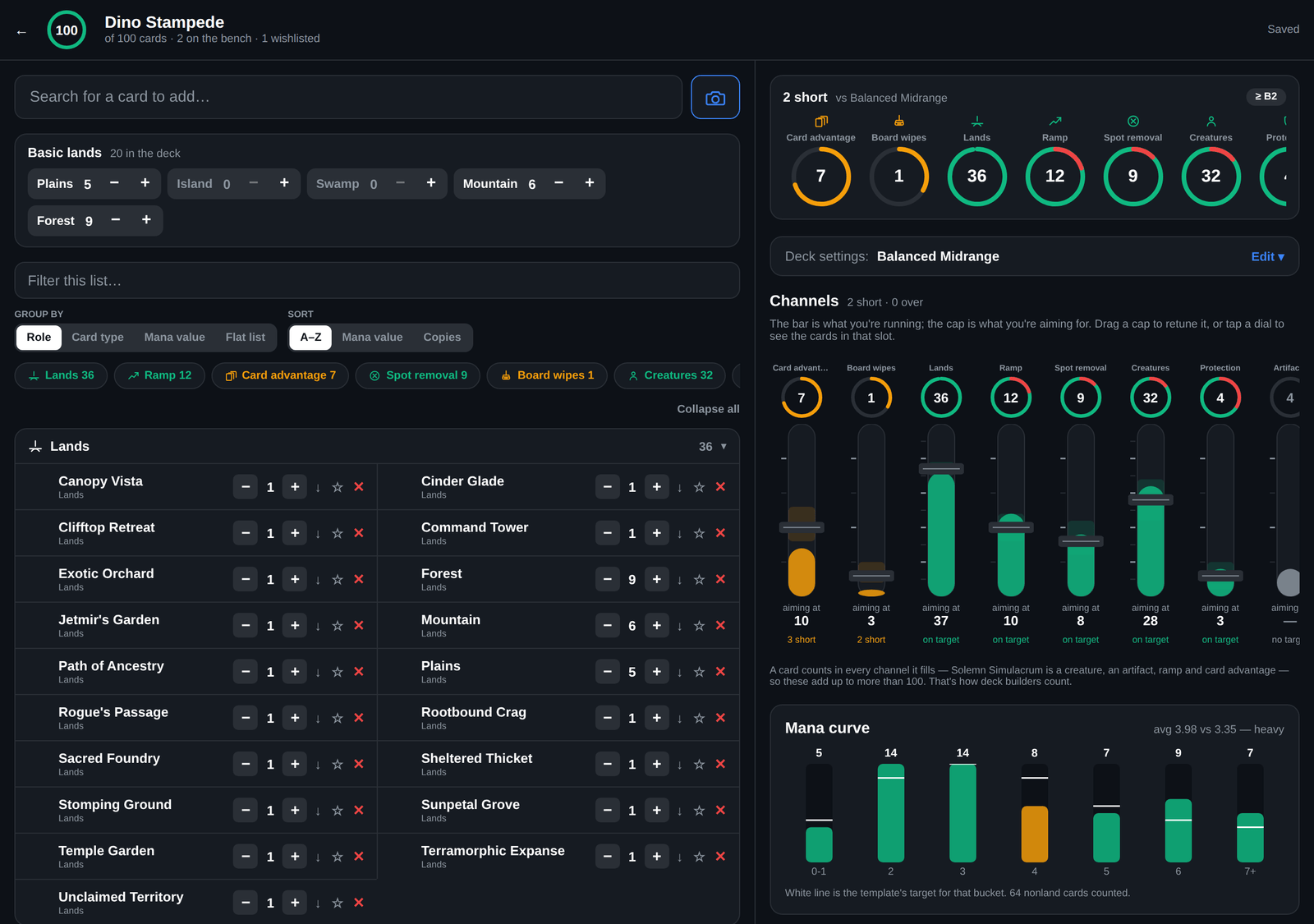
Two amber channels and a heavy curve: this deck wants three more sources of card draw and two more wipes.
How it works
Get the cards in
Search by name, scan a stack with the camera, or paste a list. The Deck Lab reads decklist exports from Archidekt, Moxfield and Manabox, and basic lands get their own steppers so twelve Islands is one control rather than twelve searches.
Pick what you are building toward
Choose a template (Aristocrats, Control, Voltron and the rest) and it sets the targets: how many lands, creatures, ramp, removal and card advantage that strategy wants, plus a target curve. Custom starts with no targets at all, so you can set your own.
Read the gauges
Every slot is a dial showing what the deck holds against what the template asks for. Short slots read amber, so the list tells you what it is missing instead of waiting for you to count it.
Move the targets when the template is wrong
The targets are faders, not rules. Pull creatures up, pull wipes down, or turn a macro knob to raise the whole interaction package at once. The gauges recompute against your numbers from then on.
Save a version and go play
Saving cuts a deck version. Every game you track is tagged with the version that was actually on the table, so the next rebuild has a win rate behind it rather than a feeling.
Edits sit in a draft until you save, so adding eighty cards is one deck version rather than eighty. The draft is kept on the device, which means a half-built list survives closing the app.
The tuning desk
A target and a gauge are the same control here, which is the idea the screen is built on. Each slot is drawn as one track: the fill is what the deck holds, the draggable cap is the target, and the band around it is the tolerance. Reading the deck becomes reading a mixing desk, and the channels whose fill falls short of the cap are the shopping list.
Templates set the starting numbers. Twenty-odd archetype blueprints, each with its own land count, role targets and curve. Pick the one you are building, or pick Custom and declare your own.
Faders override anything you disagree with. A template is a starting point, not a verdict. Move a target and the tolerance band moves with it, so asking for 32 creatures does not get you warned at 31.
Macro knobs move a whole package. Turning interaction up raises removal, counterspells and wipes together, and every knob writes the same per-slot targets a fader writes, so nothing is hidden behind it.
Tapping a dial filters the list. Tap Ramp and the list shows what is already in that slot, so "what am I short of" and "what do I have" are one gesture apart.
One thing worth knowing before the numbers confuse you: the slot counts overlap and sum well past your deck size, because a card counts toward every job it does. A creature that fetches a land and replaces itself is a creature, ramp and card advantage in three separate counts. That is how players talk about a list, and it is why the deck size is tracked as its own number.
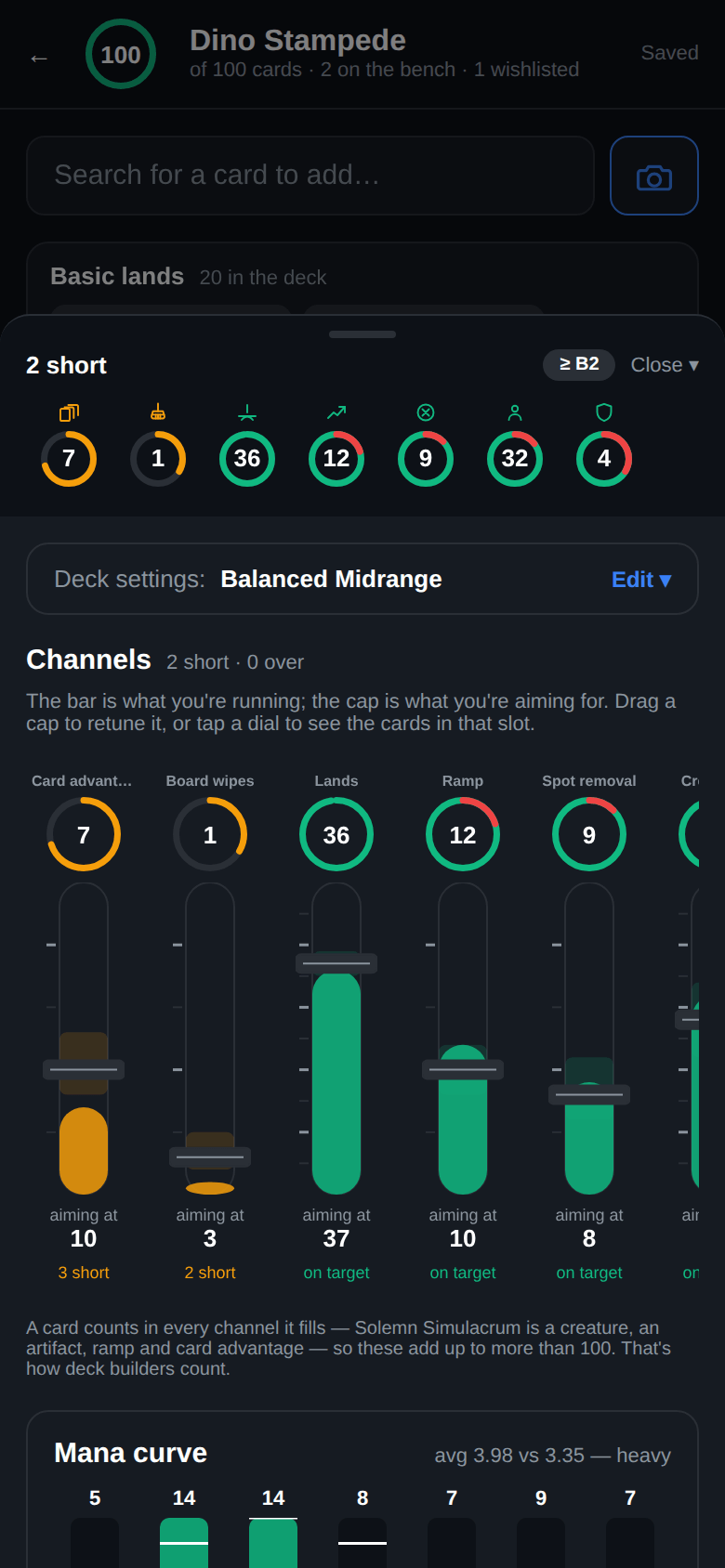
On a phone the desk is a drawer, and its summary strip answers "what is this short of" without opening anything.
A bracket read before the deck is ever played
Commander's 1 to 5 bracket system gave playgroups a shared vocabulary for the conversation that used to be "so, uh, how strong is your deck". The Deck Lab estimates where a list lands while you build it, from the signals it can count: game changers, how many tutors are in there, fast mana, stax pieces, mass land denial and extra turns. Alongside it, the AI rating reads the whole list and writes a review with the interactions it thinks the deck is actually built around.
Both are a floor rather than a verdict, and the page will keep saying so. Two individually unremarkable cards that win on the spot together are looked up in a combo database rather than guessed at. That database only holds combos somebody has written up, so a deck can be higher than its estimate and never lower. When the bracket you declare and the bracket the contents imply disagree, that gap is precisely what a pre-game conversation is for.
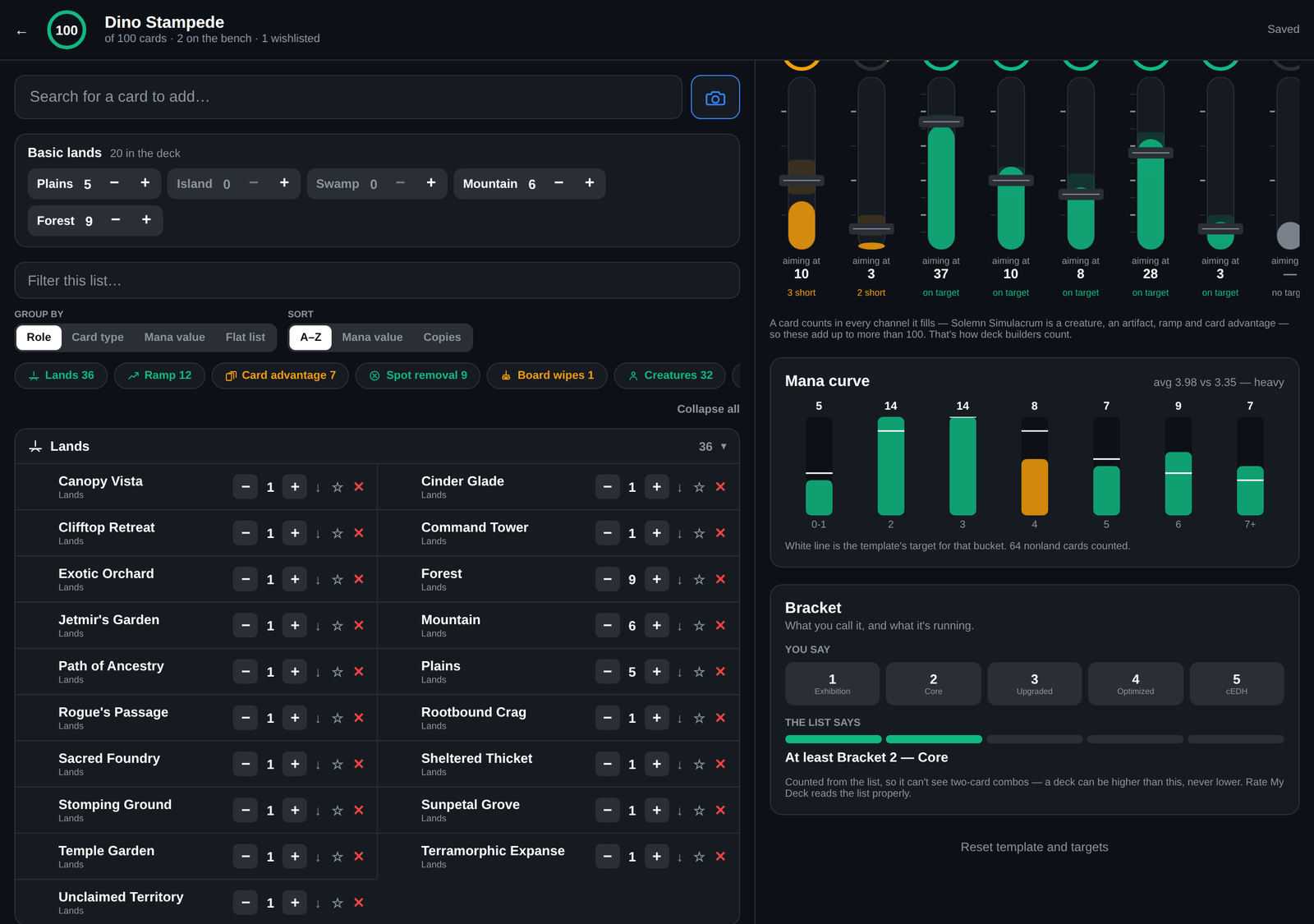
The bracket panel keeps the deck you declare and the deck you are running as two separate readings.
Sideboards and wishlists
A decklist is rarely just the deck. The Deck Lab keeps two sections beside it, and neither is counted in any gauge: a sideboard for cards you own and are not playing tonight, and a wishlist for cards you do not own yet. Keeping them apart matters, because "what could I swap in this week" and "what should I buy next" are different questions and merging them answers neither.
They still get read where it helps. A deck rating knows what is on your bench, so it will suggest a card you already own before one you would have to go and buy.
How it compares
Worth being straight about, because a couple of these are the reason plenty of players will keep a second tool open, and that is a perfectly sensible way to work.
Card pricing and a public database of other people's decks both live here too now, through My Library and TurnZero HQ's own /decks pages, but both are newer and smaller than on a site that's been doing nothing else for over a decade. If your build starts by browsing what everyone else runs with a commander, or your collection is deep enough that trading history matters, start there and bring the list across. Our roundup of deckbuilding apps → covers who is good at what.
The part nobody else closes
Every deck builder is excellent at producing a list and silent about what happens next. You rebuild, you play for a month, and the only evidence the rebuild worked is a feeling, because a deck's lifetime win rate blends every version of it under one name. The list you played in March and the one you play now are the same row in the table.
Saving in the Deck Lab cuts a version, and every tracked game is tagged with the version that was actually on the table. Win rate and deck MMR split per version, both globally and inside your own playgroup, so "is this build better than the last one" has an answer. That loop is the reason to build the deck in the same place you track the games.
Building a first Commander deck and wanting to know what a normal list looks like
Upgrading a precon and trying to work out which ten cards to cut
Tuning a deck that keeps losing, without knowing which change was the good one
Checking a list against a bracket before a pod you have not played with before
Frequently Asked Questions
Is TurnZero HQ's deck builder free?
Yes. Building decks, scanning cards, importing lists and the AI deck rating are all free, on iOS, Android and the web. You do not need an account to try the measurement side: the Rate My Deck tool on this site reads any decklist and returns the same slot counts, curve and bracket read in your browser with nothing to sign up for.
Can I import a deck from Moxfield or Archidekt?
Yes. Paste an Archidekt, Moxfield or Manabox deck link and the list comes across, or paste the text export from anywhere that produces one. TurnZero HQ reads section headers, so a sideboard stays a sideboard instead of inflating the deck to 140 cards, and it strips the set codes and collector numbers that deck sites append to card names.
Does this replace Moxfield or Archidekt?
For building and measuring a Commander list, it does the job, and it now covers card pricing, collection tracking and a public database of other people's decks too, through My Library and TurnZero HQ's own public deck pages at /decks. Both of those are newer and smaller here than on a site that has been doing nothing else for over a decade, so a deep trading history or a huge browsable deck index is still a real reason to keep both tools open. What TurnZero HQ has that no decklist tool does is the results: it tracks the games, so it can tell you whether the version you just built is beating the version you retired.
Why do the slot counts add up to more than 100?
Because a card counts toward every job it does. Solemn Simulacrum is a creature and an artifact and ramp and card advantage all at once, so it appears in four counts. That is how deck builders count when they talk about a list, and forcing one bucket per card would make most of the numbers wrong. The deck size is counted separately and is exactly what it says.
How does it work out my deck's bracket?
Two ways, and they answer different questions. A deterministic estimate updates while you build, from the signals it can count (game changers, tutor density, fast mana, stax pieces, mass land denial and extra turns) and from the combos in the list, which are looked up rather than counted. The AI rating reads the whole list and writes a review. Both report a floor rather than a verdict, because a combo database only knows the combos somebody has written up and can never prove your deck has none.
Can I keep cards beside the deck without counting them?
Yes, in two places. A sideboard is cards you own and are not playing tonight; a wishlist is cards you do not own yet. Both sit outside the 100 and neither is counted in any gauge, so a 99-card deck with forty cards on the bench still reads as a 99-card deck.
Do I need to have played games before the deck builder is useful?
No. The targets, the curve, the role counts and the bracket estimate all read the list itself, so they work on a deck that has never left the box. Game history adds the second half: per-version win rates and deck MMR, which are the numbers that say whether a rebuild actually worked.
Build the deck where the games get counted.
The Deck Lab measures the list while you build it, then tracks what every version of it actually does at the table. Free on iOS, Android and the web.
Create Free Account