Feature
My Library: The MTG Collection Tracker Built Into TurnZero HQ
Every card you own, in one place, whether it's built into a deck, scanned into a pile, or typed in from memory, with total value, folders, and nightly-synced pricing. It's the collection side of the same account that already tracks your decks and your games.
Start tracking your collection today
Scan a pile, search a card in, or save a deck. My Library counts every copy and prices it nightly. Free, with nothing to import.
Create Free AccountThe problem it solves
Most players' actual collection lives split across three places: whatever's built into their decks, whatever they've scanned or catalogued somewhere, and a mental note about the loose cards sitting in a box that aren't in any deck at all. None of those three add up to an answer for "how many of these do I actually own" or "what is all of this worth" without cross-referencing by hand.
My Library rolls all three into one inventory automatically, without asking you to import your decks into a separate tracker or keep two apps in sync.
How cards get in
There's no single "add everything" step. My Library is built from three sources that already exist in your account, plus one you fill in by hand:
It's already in a deck
Any card sitting in one of your saved decks counts toward your library automatically, whether the deck is active or archived and whether the card is in the 99 or on the bench. There's nothing to import twice.
Scan a pile with your camera
Point the scanner at a stack of cards with no deck selected and confirmed cards land in your library as scanned copies instead of in a decklist. It uses the same recognition TurnZero HQ uses to scan cards straight into a deck, aimed at a different destination.
Search and log a loose copy
For a card you own but haven't scanned or built with, search the catalog and set how many you have. This is the one place counts are typed rather than derived, which is what lets a stepper track spares, such as three extra Sol Rings sitting in a box.
A card can be in more than one bucket at once, such as three copies in a deck and two more sitting loose, and the total reflects all of it without double-counting a card that shows up in two of your decks.
What it tracks
The library reports total cards and distinct cards, plus a total value split into priced and unpriced counts, so a card with no listed price is reported as unpriced rather than silently counted as worth nothing. Every card in the list shows exactly how its copies break down: how many are built into a deck, how many came from a scan, and how many are loose, so the number on screen always has an explanation behind it rather than being one undifferentiated pile.
Total & distinct cards: how much you own, and how much of it is unique
Total value: priced and unpriced counts kept apart, never averaged together
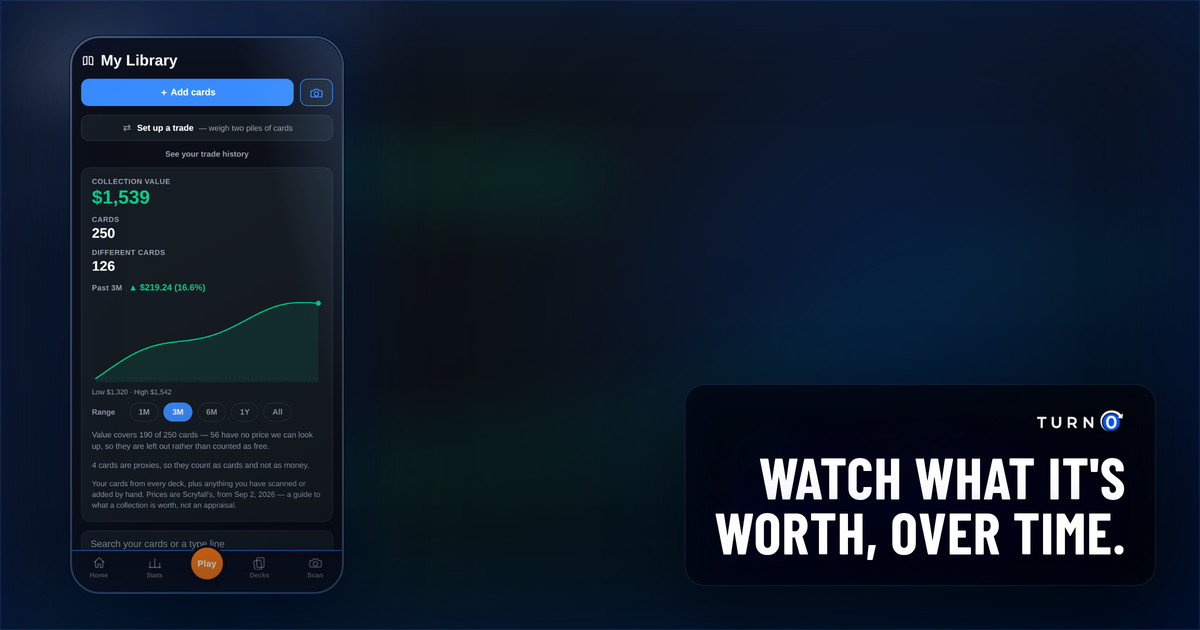
Value over time: a Premium chart of what the collection has been worth, tracked nightly for every account
Per-card source: deck copies, scanned copies, and loose copies, broken out on every card
Which decks hold it: every deck a card appears in, including whether it's in the 99 or the sideboard
Collection value chart
TurnZero HQ snapshots what your collection is worth every night, for every account, whether or not you pay for anything. Premium turns that history into a chart above the collection total, showing which way the value has moved over the past month, three months, year, or your full tracked history, with a low and high printed under it so a small move on a big collection doesn't look like a big move.
A free account still sees its total value, which never moves behind a paywall, and gets a preview of the chart in its place that links to Premium. Because the nightly recording runs for every account regardless of tier, upgrading later doesn't start the history over; it unlocks what was already being kept.
Folders
Folders group cards however you want to think about them, in one of six colors: a trade pile, cards you're considering for a future build, or anything else useful. Filing a card into a folder is purely organizational: it doesn't touch that card's count or its value, so a folder can never disagree with the totals the rest of the library reports.
Pricing
Prices sync from a nightly catalog import rather than a live lookup on every screen, so the total value figure is at most a day old. A card has no listed price fairly often, and My Library shows that as unpriced instead of guessing at a number, or worse, showing $0 and understating what the collection is actually worth.
Who this is for
Anyone who wants "what do I own and what's it worth" answered without a separate app
Players building decks from a physical collection who want the pile and the decklists in sync automatically
Anyone who's scanned or logged cards elsewhere and wants a single number that doesn't require reconciling two apps
Frequently Asked Questions
What is My Library in TurnZero HQ?
My Library is TurnZero HQ's collection tracker: one inventory of every card you have evidence of owning, pulled together from your decks, your card scans, and copies you've logged by hand. It reports total cards, distinct cards, and total collection value, and it's free to use, not behind a premium tier.
Can I see how my collection's value has changed over time?
Yes. TurnZero HQ records what your collection is worth every night, and Premium accounts get a value chart above the collection total showing that history over 1M, 3M, 1Y or all-time windows, with the change and direction called out. The recording runs for every account, paying or not, so a free account that upgrades later gets its history from day one rather than starting from zero.
How do cards get into My Library?
Three ways, and they all land in the same inventory: any card already in one of your decks counts automatically, scanning a pile of cards with no deck selected adds them as owned-but-unplayed copies, and searching the catalog lets you log loose copies by hand for anything you own but haven't scanned or built with yet.
Does My Library show what my collection is worth?
Yes. Prices sync from a nightly card catalog import, and the total is broken into priced and unpriced cards rather than guessing at cards with no listed price. A card with no price on file shows as unpriced instead of being counted as worthless. TurnZero HQ never reports a missing price as $0.
Can I organize my library into folders?
Yes. Folders are only for grouping, such as a trade binder or a shelf of cards you might want, and come in six colors so you can tell them apart at a glance. Filing a card into a folder doesn't change its count or its value; it's purely about finding things again.
Can My Library track Pokémon cards too?
Yes. A game menu beside the My Library title switches between Magic, Pokémon, One Piece, Yu-Gi-Oh!, Riftbound, Star Wars: Unlimited, Lorcana and All games. The Pokémon collection records each copy's variant, condition, language and grade, prices it daily from TCGplayer, and adds set completion, binders and CSV import. All games shows one total across every collection.
Can My Library track One Piece Card Game cards?
Yes. Switch the game menu to One Piece to search TCGplayer's One Piece catalog by name or card number, add the exact printings you own (the base card, Parallel, Alternate Art and so on, normal or foil), and scan cards in by their card number. Each printing is priced daily from TCGplayer and the collection is added into the All games total.
Can My Library track Yu-Gi-Oh! cards?
Yes, behind the same game menu. The Yu-Gi-Oh! collection records each copy's printing (set code and rarity), edition, condition, language and grade, prices it daily from TCGplayer per printing and edition, and adds set completion, binders and CSV import and export. Its value counts toward the All games total.
Can My Library track Star Wars: Unlimited cards?
Yes. Switch the game menu to Star Wars: Unlimited to search the English catalog by name or by set code and number, and add each printing you own (Hyperspace, Showcase and Prestige versions are their own printings) with its finish, condition, language and grade. It's priced daily from TCGplayer, with set completion, binders, CSV import and export and a scanner, and the collection is added into the All games total.
Can My Library track Riftbound cards?
Yes, behind the same game menu. The Riftbound collection records each copy's printing (keyed by Riot's card id, so an alternate art or signature printing is its own card), finish (Normal or Foil), condition, language and grade, prices it nightly from TCGplayer, and adds set completion, binders and CSV import and export. Its value counts toward the All games total.
Can My Library track Disney Lorcana cards?
Yes, behind the same game menu. The Lorcana collection records each copy's printing (keyed by set and collector number, so an Enchanted or a promo is its own card), finish (Normal or Foil), condition, language and grade, prices it daily from TCGplayer through Lorcast, and adds set completion, binders and CSV import and export. Its value counts toward the All games total.
Does My Library replace a dedicated collection tracker like ManaBox or Deckbox?
For most players building and playing Commander decks, yes. It covers what they check most: what they own, roughly what it's worth, and which deck each card is tied up in. For Magic, it tracks quantity and value at the card level rather than breaking a collection out by specific printing, foil finish, or condition, and it doesn't keep want lists the way Deckbox does. Trades go through TurnZero HQ's separate trade tool, which can start from another player's library where they permit it. If that granularity matters to you, pairing it with a dedicated tracker still makes sense. Our full comparison of collection tracker apps covers the options.
See your whole collection in one place.
Scan a pile, build a deck, or log what's in the box. My Library keeps count either way.
Create Free Account