How to use TurnZero HQ
Gatherings: one night, not five loose games
A gathering is an evening of Magic with a roster, a join code, standings, a feed and a recap. It is the thing that makes game three relate to game one, instead of leaving you with a flat list of unconnected results.
What a gathering actually is
Most trackers treat a game as the unit. You open one, you count life, somebody wins, and the app forgets the table existed. That is fine for the fifty minutes you are playing and useless the moment somebody asks how the night went. A night is several games, often four or so with the same six people rotating through, and the interesting questions all live at that level: who is actually up, whose deck keeps winning, what happened in game two that everyone is still talking about.
A gathering is TurnZero HQ's name for that evening. It holds a roster of who turned up, every game played inside it, a combined leaderboard across all of them, a feed of what the table said and logged, and a recap at the end. Each game still stands on its own, with its own board and its own result. The gathering is what makes them add up.
Starting one
The orange Play button sits in the middle of the tab bar on every screen, and it is the one door into a game. Press it and the sheet offers everything that could reasonably mean "I want to play now": resume the game you are already in, start a new one, join a friend's gathering, join a public one, or type a code.
Starting a game from there walks through setup in two steps rather than one screen of nine decisions. The first is the roster: who is playing, and what each of them brought. The second is the table, which is the board diagram itself. Whoever started the gathering is seated automatically, so nobody has to add themselves to their own game.
A gathering can also be scheduled ahead of time rather than started on the spot. Scheduled and past nights both appear on the calendar reached from home, which is the fastest answer to "when are we playing next."
Getting people in, accounts or not
Every gathering has a short join code, and that one code is also a link and a QR. Adding the person who turned up forty minutes late takes reading them five characters, not looking up an account by name and hoping you have spelled it right. A gathering marked public goes further and is joinable straight from the Play sheet, without anyone passing a code around at all.
Guests: seat somebody with no account at all. Their results are recorded against that seat, and an invite link lets them claim that history later if they do sign up. Nobody is kept out of a game because they have not installed anything, and nothing they played is thrown away when they do.
Friend invitations: the scheduling form and the share sheet both carry a friend picker, so inviting people and scheduling the night are one action. An invitation arrives as a push and as a red badge on the friends icon that stays there until it is answered, which means it does not get lost because it landed while the app was closed.
Spectators: anyone can open a live board read-only. A pulsing dot on the board says somebody is watching and the Game Menu names them, so a friend can follow from the sofa without a single phone at the table buzzing.
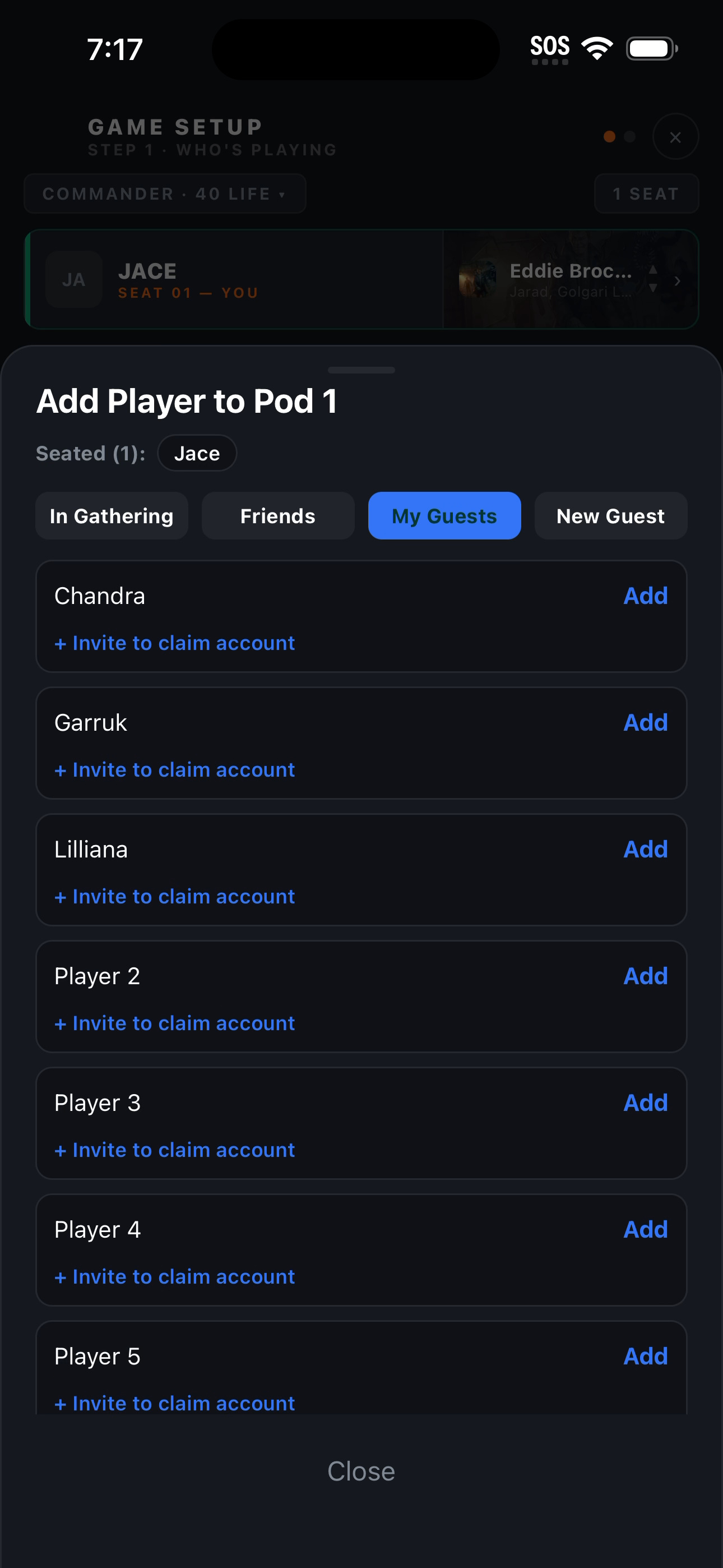
Friends, saved guests, or somebody who has never opened the app
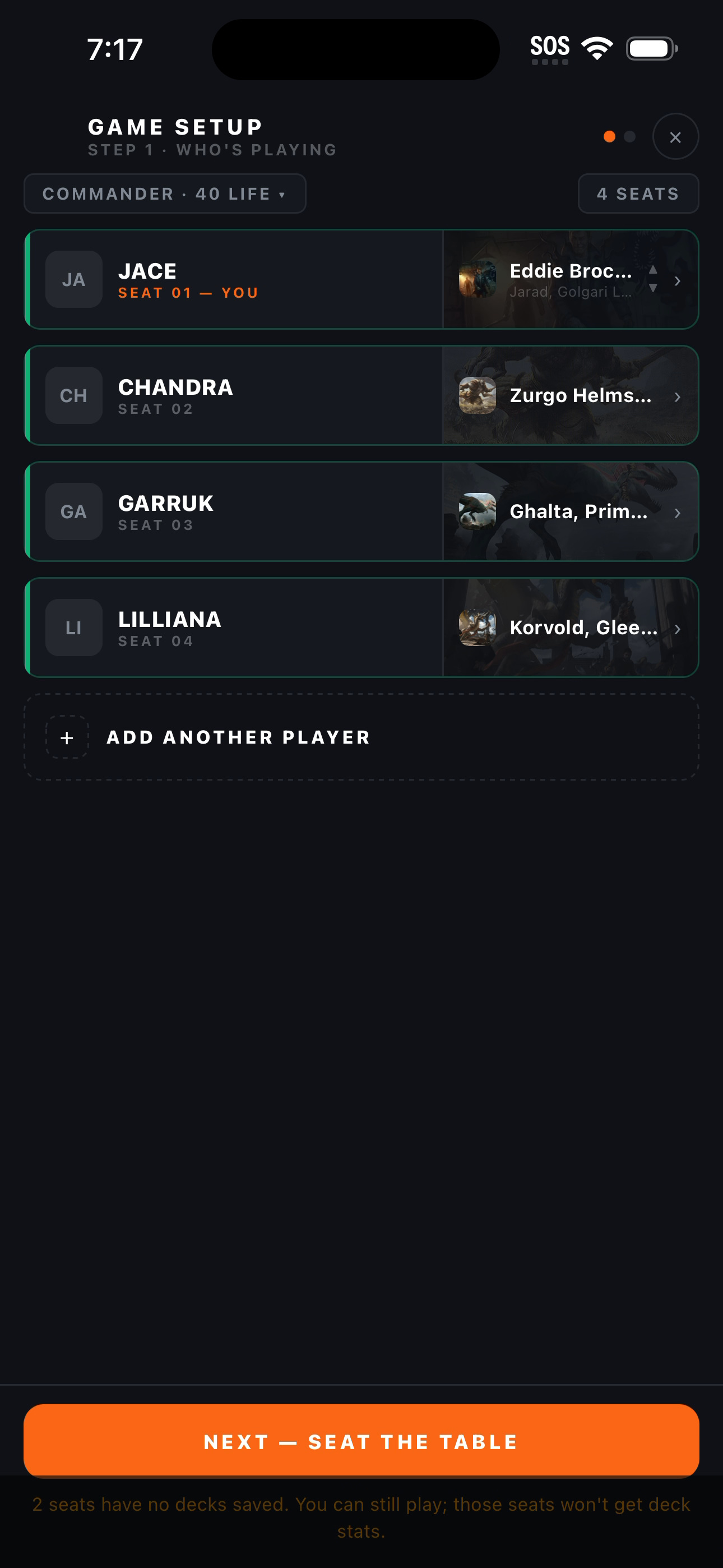
Step one done: everyone seated, everyone's deck attached
When one table is playing, the gathering gets out of the way
There is a real tension in this feature. The bookkeeping that makes a store's Friday work is exactly the bookkeeping four friends on a Tuesday do not want, and an app that makes the second group run an event to play three games has made itself worse than a notepad.
So when only one table is running, the gathering skips itself between games. You finish, you see the result, you start the next one. The standings, the participants and the recap appear at the end, at the one moment they are worth reading. Nothing is lost: the night is still being recorded the whole time, it is just not being shown to you between every game.
When several pods are running at once, the opposite is true and the gathering becomes the screen you keep coming back to. That is the case the summary hub is built for: games played, the leaderboard, participants, the feed and the recap, all in one place, with a Back to Gathering route out of every finished game.
A weekly night that sets itself up
A group with a standing Friday should not re-run the setup wizard fifty-two times a year, and a store definitely should not. A night series generates each evening's gathering on its own schedule and keeps one join code working across all of them, which is what makes a printed code taped to a counter a workable idea.
The failure this actually prevents is subtler than the saved taps. A group that has to set the night up by hand eventually forgets one week, and then another, and stops tracking altogether. A recurring night is already there when people arrive.
A playgroup is the layer above that: a name, a membership list and its own settings, owner-controlled, so a group has an identity and a private roster separate from anything public. Store nights are the other end of the same idea, and they get their own operator surfaces. TurnZero HQ for game stores →
How a night ends
The last game's winners sheet leads into a post-game summary rather than dumping you back at a list: the result, the standings, and what moved. From there the gathering's own summary is the readable version of the whole evening, and the night's statistics sit beside the leaderboard for the people who want the evening as data rather than as a story.
On Premium, a written recap of the night is generated afterward in a narrator voice you pick, and a digest email goes out to the people who took part. That email is only sent when a game was actually finished, so an abandoned gathering does not mail anybody about a night that did not happen. How AI night recaps work →
Who this is for
A weekly playgroup that wants the night to add up to something, not just four separate results
Anyone who plays with people who have not installed the app and are not going to tonight
Whoever ends up organizing, and would like to stop being the one who remembers to set it all up
Stores and clubs running a standing night on a printed join code
Frequently Asked Questions
Does everyone at the table need the app to play?
No. One device runs the board, and that is enough to track the whole game. Anyone who does have the app can join the gathering with the code and follow along, and anyone who does not can be seated as a guest.
Can I add someone who has never made an account?
Yes. Seat them as a guest and their results are recorded against that seat. If they sign up later, an invite link lets them claim that history, so the games they played before they had an account still count toward their record.
How do people join a gathering?
Three ways, all of them the same short code underneath: enter the code from the Play sheet, open a share link, or scan the QR. A gathering marked public also appears in the Play sheet's list of gatherings anyone nearby can join.
Do I have to set up a gathering just to play one game with friends?
No, and the app deliberately does not make you. When only one table is running, the gathering steps out of the way between games and only appears at the end, when the standings and the recap are actually worth reading. Four friends playing three games are not made to run an event.
How many pods can one gathering have?
Two on the free plan, up to four on Premium, and unlimited on the LGS plan built for stores running tournament nights. The standings combine every pod in the gathering into a single race for the night.
What happens if we forget to end the night?
A sweep closes gatherings that were left open. Unfinished games in them are abandoned rather than ended, so nothing is recorded with a winner nobody actually declared, and your home screen stops advertising a table nobody is sitting at.
Make tonight one night, not four loose games.
A join code, a roster that takes guests, combined standings and a recap at the end. Free to start.
Create Free Account