How to use TurnZero HQ
Phase Coach: Teach a New Player Their Turn at the Table
A new player is rarely stuck because they can't name the phases. They are stuck because nobody told them this is the moment to play a land, and asking again feels like holding up three people. Phase Coach puts their turn on the board in front of them, in order, with what to do in each part of it.
Turning it on
Start the game with turn tracking on. The coach follows whose turn it is, so it needs the app to know that.
Mark who is learning. When you set up the pod, the Options sheet has a Learning the game section with a checkbox for every seat. Mid-game, open the Game Menu on the device running the game and tap Who's learning instead.
Tick anyone who is being taught. Guests count: the player you are teaching usually has no account, and they do not need one.
Pass the turn as normal. When it reaches a learning player, the coach opens on the far side of the board, turned to face them.
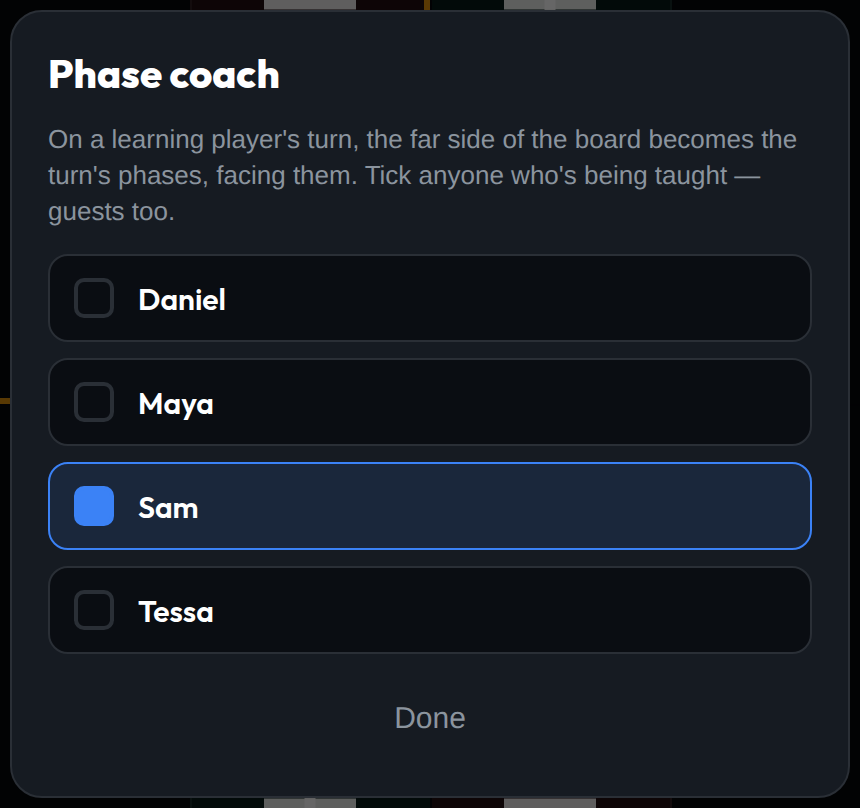
Who's learning, from the Game Menu. Here Sam is the one being taught.
If you set your own experience to Beginner in your play profile, your seat comes pre-ticked when you set up a game. That is a suggestion rather than a lock: untick it and it stays unticked. Nobody else's seat is ever ticked for them, because the person who knows who is learning is whoever is sitting at the table.
What shows up on the board
On a learning player's turn, the half of the board farthest from their seat turns into their turn, laid out in five phases and turned to face them. Their own seat, their life total and the Pass button stay exactly where they were. What gets covered is the far side of the table, which is the part they can least read from where they are sitting anyway.
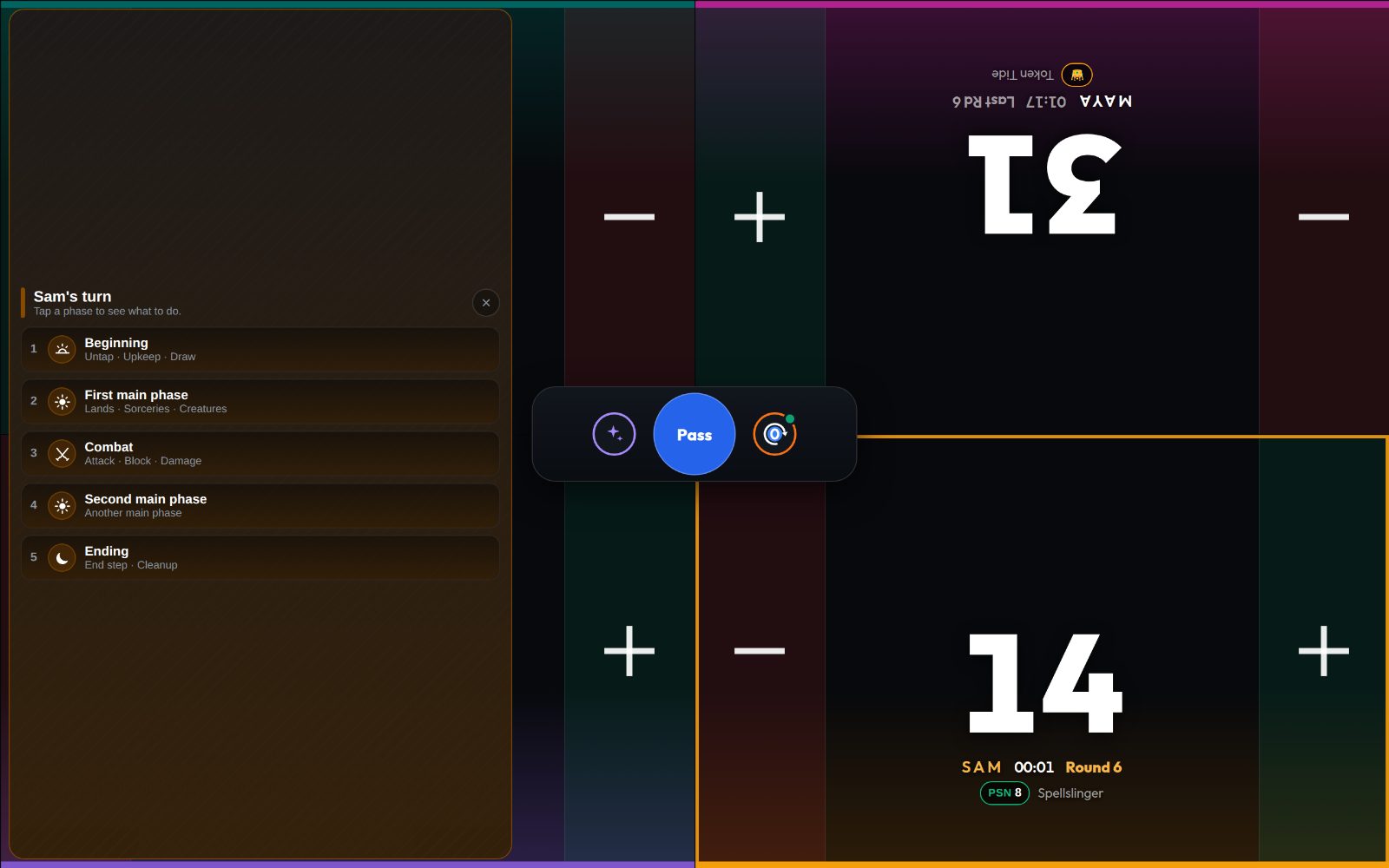
Sam's turn. Sam sits bottom right, so the coach takes the left half and faces Sam.
The panel wears the learning player's own seat color, with the same color wash and pattern as their seat. That makes it read as their turn rather than as a pop-up, and at a table with two learners it is obvious at a glance whose turn it is showing.
Reading a phase
Each of the five phases is one row: Beginning, First main phase, Combat, Second main phase and Ending. Tap one and it opens underneath the list with two things:
What you do. One instruction in plain language, set largest because it is the part a player can act on right now. In the first main phase, that is "play one land, then cast the creatures and spells you want out before you attack."
Steps. Every step inside the phase, in order, with one line on what it is for. The Beginning phase lists Untap, Upkeep and Draw. Combat lists all five of its steps, from Beginning of combat to End of combat. Ending lists the End step and Cleanup.
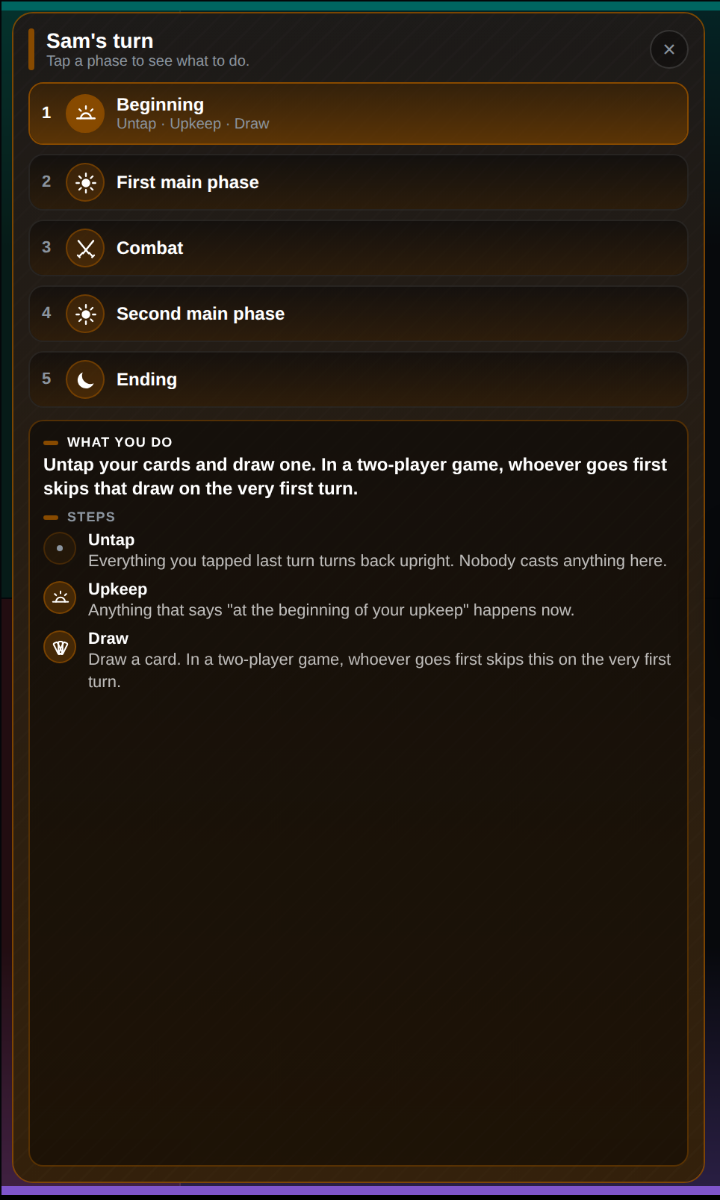
Beginning: untap, upkeep, draw
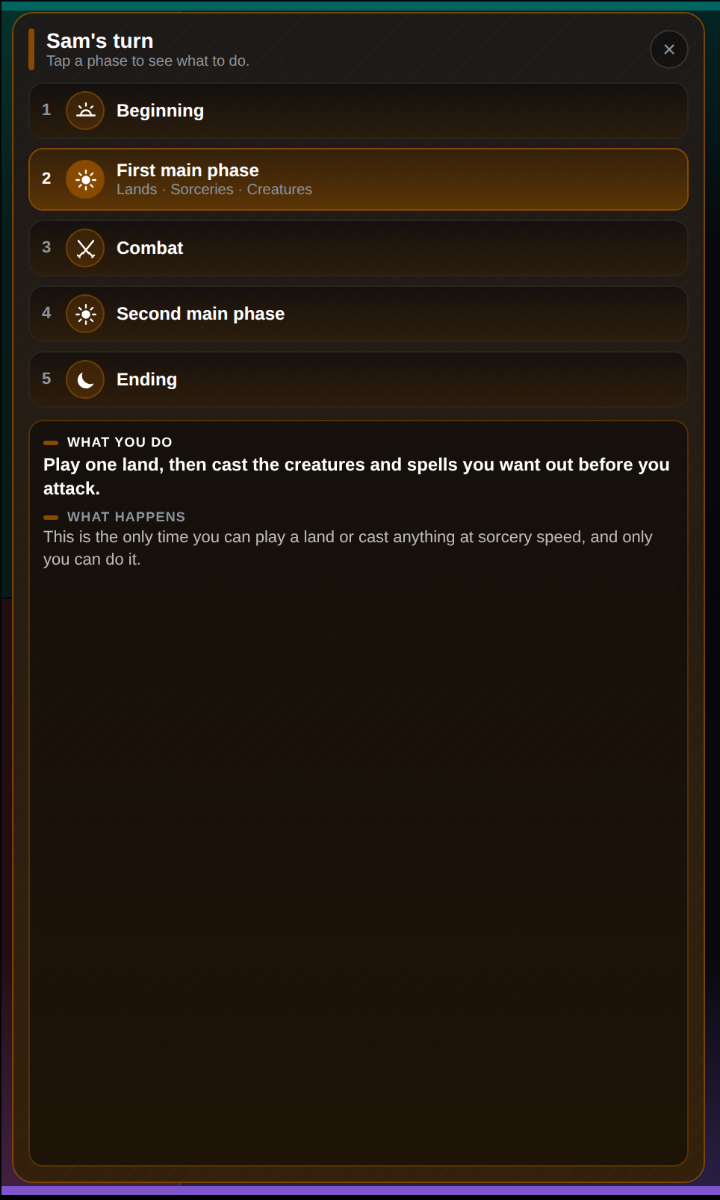
A main phase is one step, so it explains itself
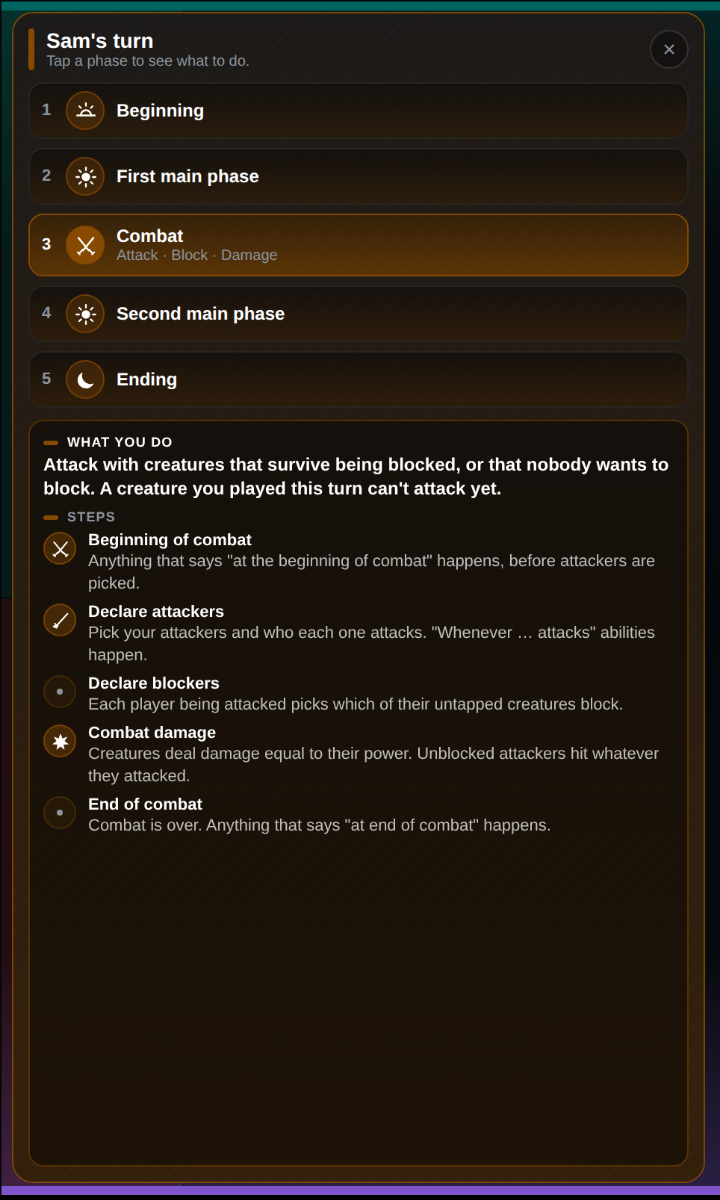
Combat: all five steps, in order
The two main phases are a single step each, so instead of a step list they say what happens in them: this is the only time you can play a land or cast anything at sorcery speed. Naming the steps matters more than it looks. The first time somebody says "in response, during your upkeep," the learning player can find the word on the board in front of them.
The copy is short on purpose. It says nothing about priority, the stack or damage assignment order. All of that is true, and none of it is what a player needs on their third turn ever. For those questions the Rulings button is already on the board, and the full phases of a turn guide → covers the rest.
What the icons mean
Every phase and step that has a moment cards care about carries an icon for it, the same marks TurnZero HQ uses for when a triggered ability fires:
Rising sun: the upkeep, where "at the beginning of your upkeep" abilities happen.
Fanned cards: the draw step.
Full sun: a main phase.
Crossed swords: combat, and "at the beginning of combat" abilities.
Single sword: declaring attackers, where "whenever this attacks" abilities happen.
Burst: combat damage.
Crescent moon: the end step, where "at the beginning of the end step" abilities happen.
Steps without a trigger of their own, such as untap, declare blockers, end of combat and cleanup, get a plain dot instead of a borrowed icon. That keeps each icon meaning exactly one moment. If a learning player sees the crescent next to a card's ability, they can find the same crescent on the Ending phase and know when it goes off. More on triggered abilities →
A reference, not a tracker
The coach never moves on by itself. The app has no way of knowing whether a table is in combat or still in the first main phase, so a panel that advanced on its own would be confidently wrong for most of a turn, in front of the one player least able to tell. A tap is a question, and the answer stays open until another phase is tapped. When the turn passes, the open phase closes, because the next turn is a new question.
One rule is easy to get wrong and the coach states it carefully: only in a two-player game does the player who goes first skip their first draw. In a multiplayer Commander game, the first player draws as normal.
Closing it and turning it off
× on the panel closes it for this turn only. It comes back on that player's next turn.
Untick them under Who's learning once a player has the turn down. That changes it for the whole game, on every device.
Phase coach in Game Options turns the panel off on this device only. The phone in the middle of the table can show it while the one in somebody's pocket, following the same game, doesn't.
Who this is for
A pod bringing a friend into Commander for the first time
Parents and partners teaching someone at the kitchen table
Game stores running learn-to-play tables on a store tablet
Newer players who want the turn in front of them without asking every time
Frequently Asked Questions
Does the player being taught need a TurnZero HQ account?
No. Every seat in the game can be ticked, guests included. The coach is drawn on the shared game board, so it only needs the device that is running the game.
Does the coach know which phase we are in?
No, and that is on purpose. Nothing tells the app which step a table is actually in, so the coach never advances by itself. It is a reference: tap a phase to read about it, and it stays open until you tap another one or the turn passes.
Can more than one player be learning at once?
Yes. Tick as many seats as you like. The coach only ever opens for the player whose turn it is, and it wears that player's seat color, so it is clear whose turn it is showing.
How do I turn it off?
The × on the panel closes it for the rest of that turn only; it comes back on that player's next turn. To stop coaching a player, untick them under Who's learning. To stop drawing it on one device while other devices keep it, switch off Phase coach in Game Options.
Teach the turn without stopping the game.
Tick who's learning, pass the turn, and let the board show them what comes next.
Create Free Account